
Easy Steps you can apply it by the following:-
Out of the box, your Android device only allows you to install apps from Google Play Store. To install software anywhere else, you have to enable installation from third-party sources. That is, enable the “Unknown Sources” setting.
- From the Homescreen go to Settings >> More.
- Go to Security >> Device administration.
- Check "Unknown Sources"
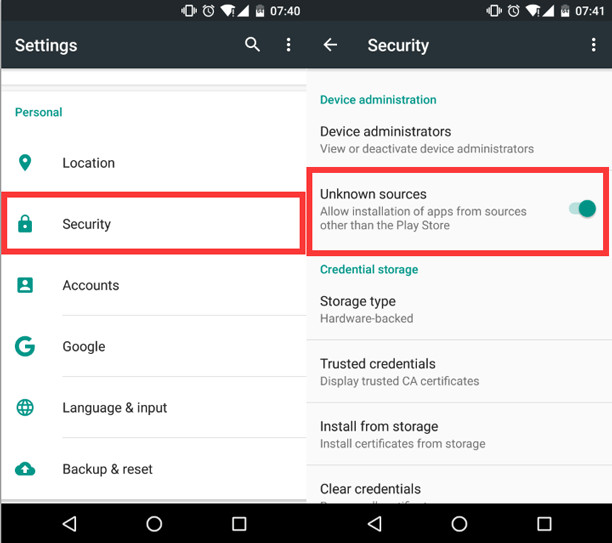 |
| how to install unknown sources Apps APK file to Android |
This will enable you to install apps from sources other than the Play Store.
You may need to adjust this according to your Android models. For some users, simply go to Settings -> Security and make sure Unknown Sources is checked. Sometimes you meet the problem of can’t downloading apps.
Do remember to make sure the Unknown sources is checked so you can download apk files other than the Play Store.
Why do we need to download apps from "Unknowns sources"?
If you know an update is out, but the Play Store hasn’t yet pushed it to your device, all you can do is wait. And even if you want to get software from the Play Store but have to download the APK manually to get around regional restrictions, you won’t be able to install it without enabling access to unknown sources. Android-app-store provides apk files with no restriction of region. You can get apps here wherever you are.


